Start with a short payment brief.
Write down the intended merchant or Ads platform, the billing currency shown in its account and who will review the request. Add the planned payment context: one charge, recurring billing or an advertising account’s collection event. Those details give the person selecting the card a concrete task to assess.
Use the companion planning checklist to keep “requested” and “confirmed” details in separate columns. The requested column records your preferences. The confirmed column records the actual offer’s terms and the source used to verify them. An empty confirmation field is a question to resolve before committing funds.
The screenshots show the fields used to prepare a card request. Keep the completed checklist alongside that request so the reviewer can resolve missing terms before funding. Use the same task reference when the offer, quote and invoice become available.
Choose the preferred card network and currency.
In Configuration, the “Preferred network” field offers Visa and Mastercard. Choose the preference your request needs, then select EUR or USD under “Preferred card currency”. These fields describe a requirement to compare with the actual card offer. Their presence in a form does not establish that a matching product is currently available.
Keep three units visible in your notes: the merchant’s billing currency, the preferred card currency and the requested top-up currency. Adspendra’s current top-up amount is entered in USD. Choosing EUR for the preferred card does not turn that field into euros or apply an exchange rate. For a USD top-up, check that the selected card supports recharges in USD and that its limits cover the request.
If those currencies differ, leave the conversion rule and resulting card credit as open items until the real offer or quote explains them. The currency guide provides the fuller comparison; this preparation step simply prevents an ambiguous request.
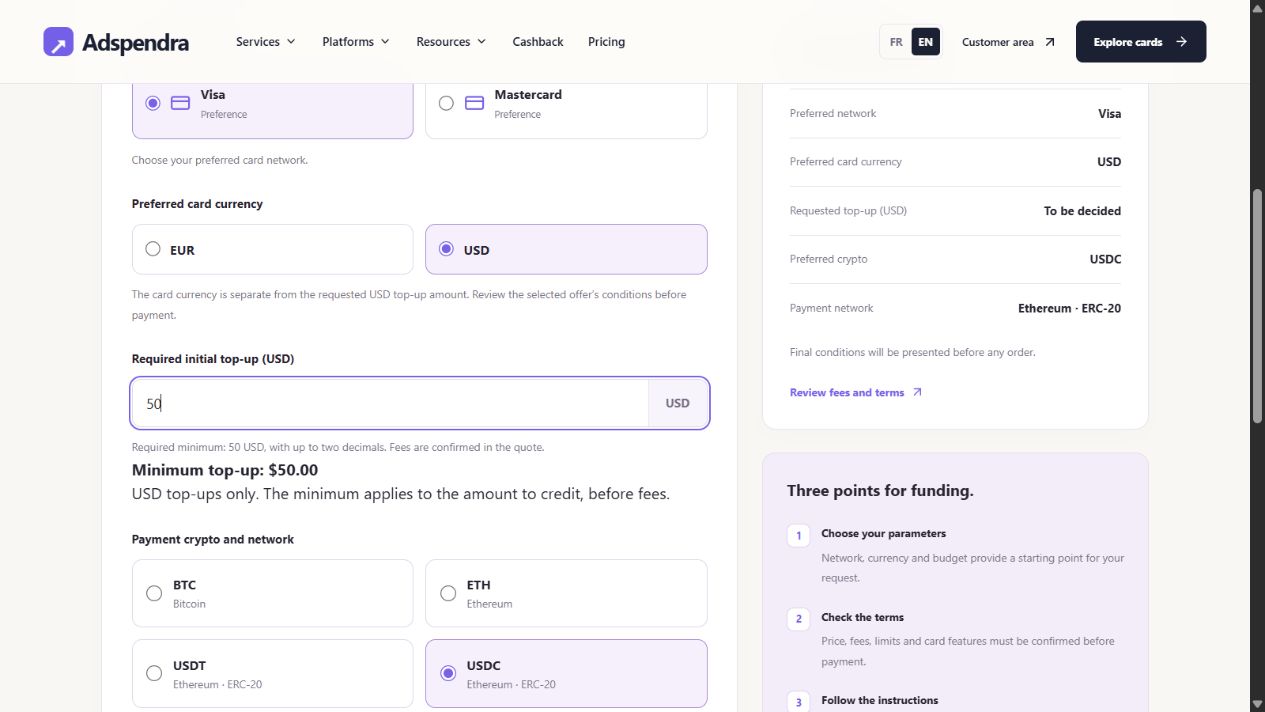
Enter the required minimum of 50 USD.
“Required initial top-up (USD)” is a mandatory field. With the current 50 USD floor, a blank entry or 49.99 cannot proceed to the summary. Entering 50.00 meets this amount check. Use at most two decimal places and review the displayed minimum if the selected card’s actual conditions impose a higher threshold.
The requested amount is net card credit, before fees. It is separate from the total amount payable, the crypto amount on a future invoice and any merchant charge. A valid 50.00 entry prepares a request; the real terms still determine the applicable fees, eligibility, maximum and final funding instructions.
In the planning sheet, write “50.00 USD requested net credit” rather than “50 dollars paid”. That wording lets a reviewer identify which amount has been chosen and which monetary details still need a confirmed quote. Do not calculate a fee-inclusive total from the headline percentage before its basis is stated.
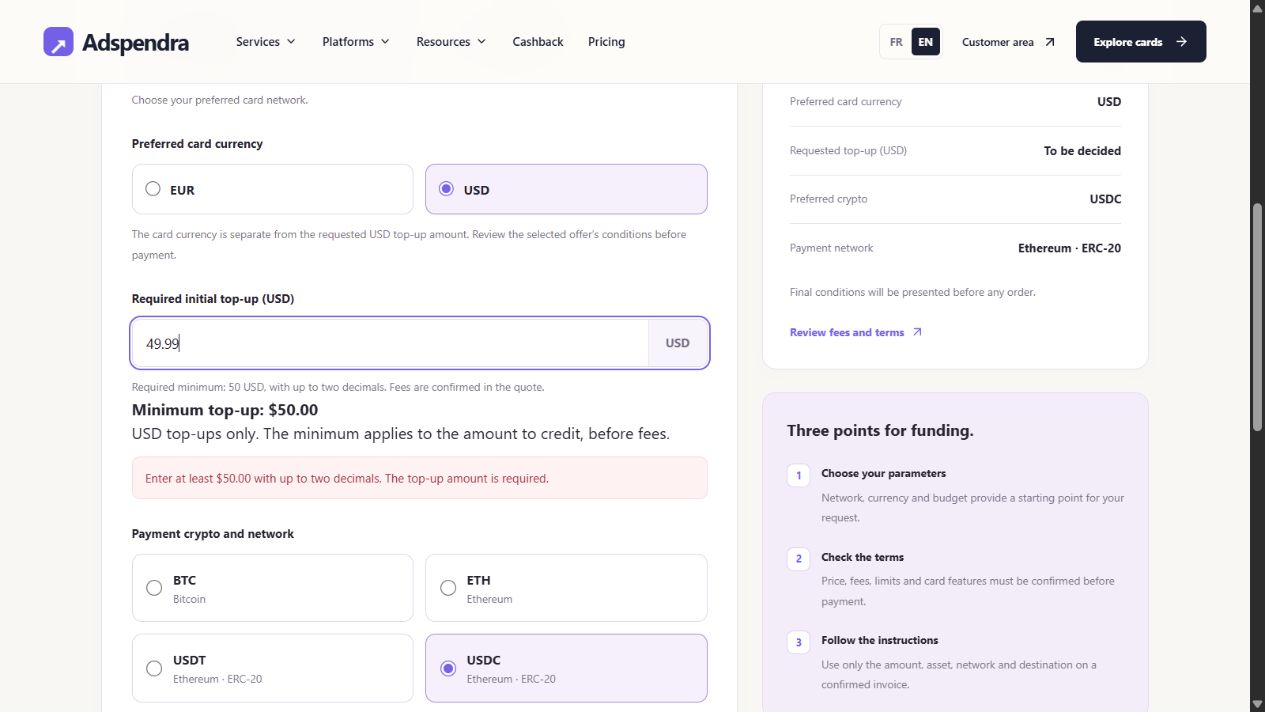
Record crypto and network together.
The next field is “Payment crypto and network”. Record the full selected pair: for example, BTC on Bitcoin. The preparation interface also separates USDT on Ethereum from USDT on Tron. Keeping only “USDT” in a handoff loses a choice the form explicitly requires.
Read the network shown by the actual selection. The current fixed-address USDC preparation choice is Ethereum; a separate USDC Polygon invoice route has its own instructions. A page about one route does not rename the other. A fixed receiving address and an address-only QR do not supply the crypto amount, expiry or payment confirmation for an order.
Keep the exact invoice privately when one is supplied. Use the existing funding guide for its amount, asset, network, destination and status checks. This worksheet records the requested rail so a reviewer can compare it with those instructions before any transfer.
Compare the summary with the original brief.
Choose “Review my choices” and read all five summary fields: preferred network, preferred card currency, requested top-up in USD, preferred crypto and payment network. If one differs from the brief, use “Edit my choices” and review the corrected summary again. Retain the purpose of the request alongside those fields.
Next, check the actual offer for its issuer and eligibility, permitted use, currency, fee basis, limits and funding route. Keep the source reference beside each confirmation in the worksheet. The preparation summary remains a preference record; a real quote and invoice must provide their own authoritative amounts and terms.
When a material detail is missing, name it precisely: “fee basis not supplied”, “card currency awaiting confirmation” or “merchant use needs review”. A short unresolved item helps the next person obtain the right answer. Sending additional funds cannot answer an unstated offer condition.
Work through one illustrative team handoff.
Imagine a campaign operator whose merchant account bills in USD. They request a Visa preference, USD card currency, 50.00 USD net initial credit and BTC on Bitcoin. The reviewer receives that brief plus the summary. This is an organisational example using the current form’s minimum, rather than a card price, a claimed purchase or a guarantee that 50 USD covers the merchant’s next charge.
The reviewer fills the confirmed column only from actual terms: suitable available offer, permitted merchant use, fee basis, applicable limits and invoice instructions. If a term remains unresolved, the payment decision waits for that answer. If a different card or funding route is proposed, revise the request and check the matching summary.
For the later real operation, use separate milestones: invoice issued, crypto payment confirmed, card credit available, merchant payment result and eligible settled spend. Put the genuine reference beside its observed state. A request can be prepared while every later milestone remains unconfirmed; the worksheet never turns one stage into another.
Use the printable checklist for the next decision.
Open the companion checklist, add optional non-sensitive notes and use your browser’s Print command. Its first table captures the request; its second checks the offer and monetary conditions. The final milestone list gives the reviewer a place to identify the next unresolved stage. The sheet has no submit action, calculation or account connection.
Keep full card numbers, CVC, PIN, login credentials, private keys and recovery phrases outside this shared planning record. Use your authorised private account and the real invoice for operational details. The printable sheet needs a task reference and a source for each confirmed condition, rather than a copy of payment credentials.
Before proceeding, answer three questions: do the summary and brief agree, do the actual terms meet the intended payment, and do confirmed instructions identify the exact funding operation? Then use the appropriate existing guide: funding for the transfer, the first-Ads-payment checklist for the merchant account, or the payment-status guide for a result already observed.
Start with the question you have.
- Open the printable card payment planning checklist
A fillable English request-and-confirmation worksheet. Add optional non-sensitive notes, then print it through your browser.